
Key management
Generate, import, export, and install SSH keys from the keys tab or CLI.
Switch to the keys tab with 2. Bast lists keys it finds on disk, keys in ssh-agent, and which hosts reference each key.
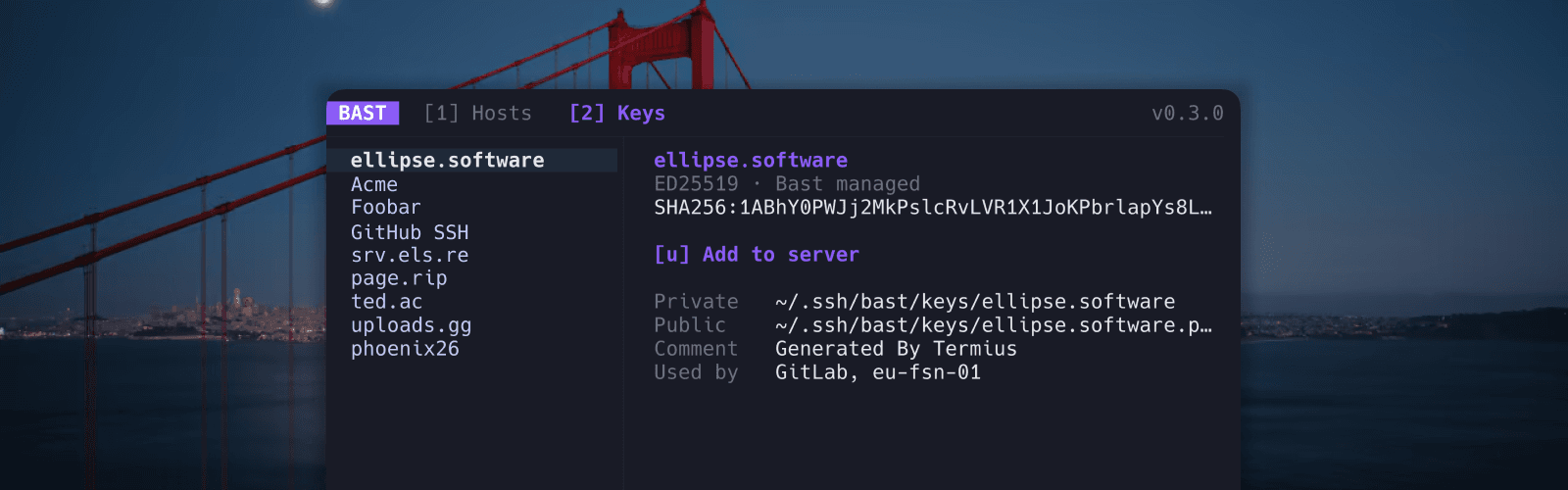
Actions
| Key | Action |
|---|---|
g | Generate a new ed25519 or RSA keypair |
i | Import an existing private key from a file or pasted PEM |
e | Edit the comment on a public key |
a | Push a public key to a remote ~/.ssh/authorized_keys |
x | Export key files to a folder you choose |
p | Promote an external key into Bast-managed storage, or change a managed key passphrase |
c | Copy the public key to your clipboard |
d | Delete a Bast-managed keypair |
Generate
Create a new key in Bast's managed keys directory (~/.ssh/bast/keys). Choose ed25519 or RSA and optionally set a passphrase.
Import
Bring in an existing private key from a file path or pasted PEM text. Bast can derive the public key if you do not provide one. It verifies keypairs on import so mismatched public and private keys are caught early.
Import from stdin without putting key material in shell history:
bast keys import work --private - < id_ed25519Promote
Copy an external key from ~/.ssh into Bast-managed keys so it can participate in Vault:
bast keys promote id_ed25519 --name workAdd to server
Push a public key to a remote server's authorized_keys. Bast may prompt for a password if the server requires it. This uses your system ssh to copy the key.
Export
Copy key files to a directory you choose. You confirm by typing EXPORT because private keys are sensitive. Pass --yes on the CLI to skip the confirmation in scripts.
Storage
Generated and imported keys live in ~/.ssh/bast/keys. Private keys are written at mode 0600. Never paste real private keys into issues or bug reports.